 AudioInfo Viewer
The technical details, together.
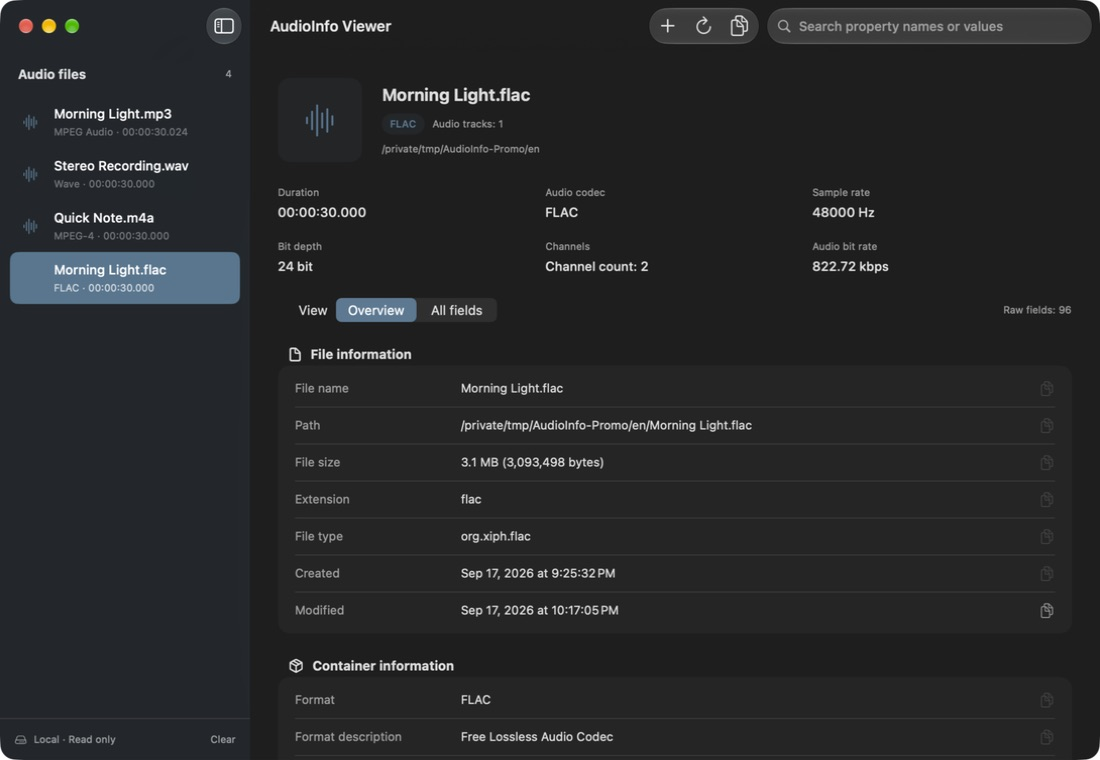
See the container and each audio track: codec, duration, sample rate, bit depth, channels and bitrate. Unavailable or inapplicable values are clearly marked.
MADE FOR macOS
Inspect sample rate, bit depth, channels, bitrate and metadata in one native Mac app. Add your files, find the details, and copy what you need. Everything is read locally.
Coming to the Mac App Store
Requires macOS 14 or later
Features
A clear overview when you need a quick answer. Original fields and their sources when you need to look closer.
See the container and each audio track: codec, duration, sample rate, bit depth, channels and bitrate. Unavailable or inapplicable values are clearly marked.
Read embedded tags, cover art, lyrics and chapters when the file contains them. Metadata values stay in their original language.
Search original field names, translated labels and values. Copy one item or all properties; copying all includes fields hidden by your search.
SUPPORTED FORMATS
Add multiple files and switch between them in the sidebar. Formats are identified from the file contents.
Includes AAC and ALAC in M4A/M4B, and DSD in DSF/DFF. Readable fields depend on the file and parser support.
How it works
Drag in one or more files, use Add Files, or press ⌘O.
Select a file, browse its overview or all fields, and search for a property or value.
Copy individual values, or press ⇧⌘C to copy all properties. Original files remain unchanged.
No. AudioInfo Viewer reads the files you choose locally and does not modify or upload them. Files in a cloud-managed folder may be downloaded or synced by that service according to your settings.
No. The file list and inspection results are kept only for the current session. Removing a file or clearing the list does not delete the original. Copied text remains under the control of the system clipboard.
It is a metadata viewer, with no playback, tag editing, signal analysis or report export. Loudness, tempo and key shown in tags are existing metadata, not measurements calculated by the app.
Local reading. Read-only access. Learn how the app handles your files and how this website is hosted.